
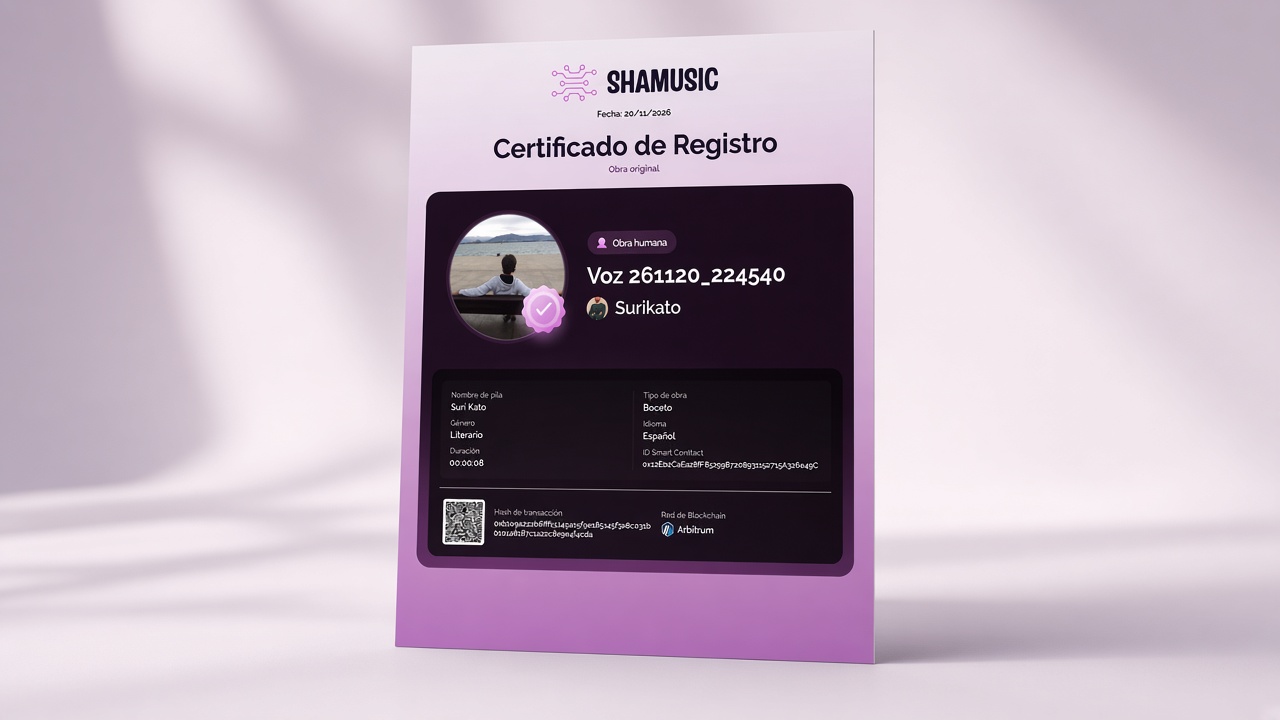
When you register a work on Shamusic you download a two page PDF. This piece walks every field of that certificate, the QR code and the Arbiscan page, so you know exactly what you hold. It is written for you, the artist who already registered or is about to. This is general information, and for a specific case the view of a professional is the right next step.
What this certificate is
The Registration Certificate is the authorship proof Shamusic issues when you upload the work. The file, the date, the authors and a public verification link are fixed at that moment. The footer of the document puts it this way: Shamusic certifies that the work was registered, generating a digital fingerprint on blockchain as proof of authorship with international validity.
In practice it is a timestamp seal. Anyone who opens the PDF sees who registered, when, and with which identifiers. The certificate is issued at the time of registration. Pricing is on the plans page: 3 works free when you create the account.
The header: date, title and type
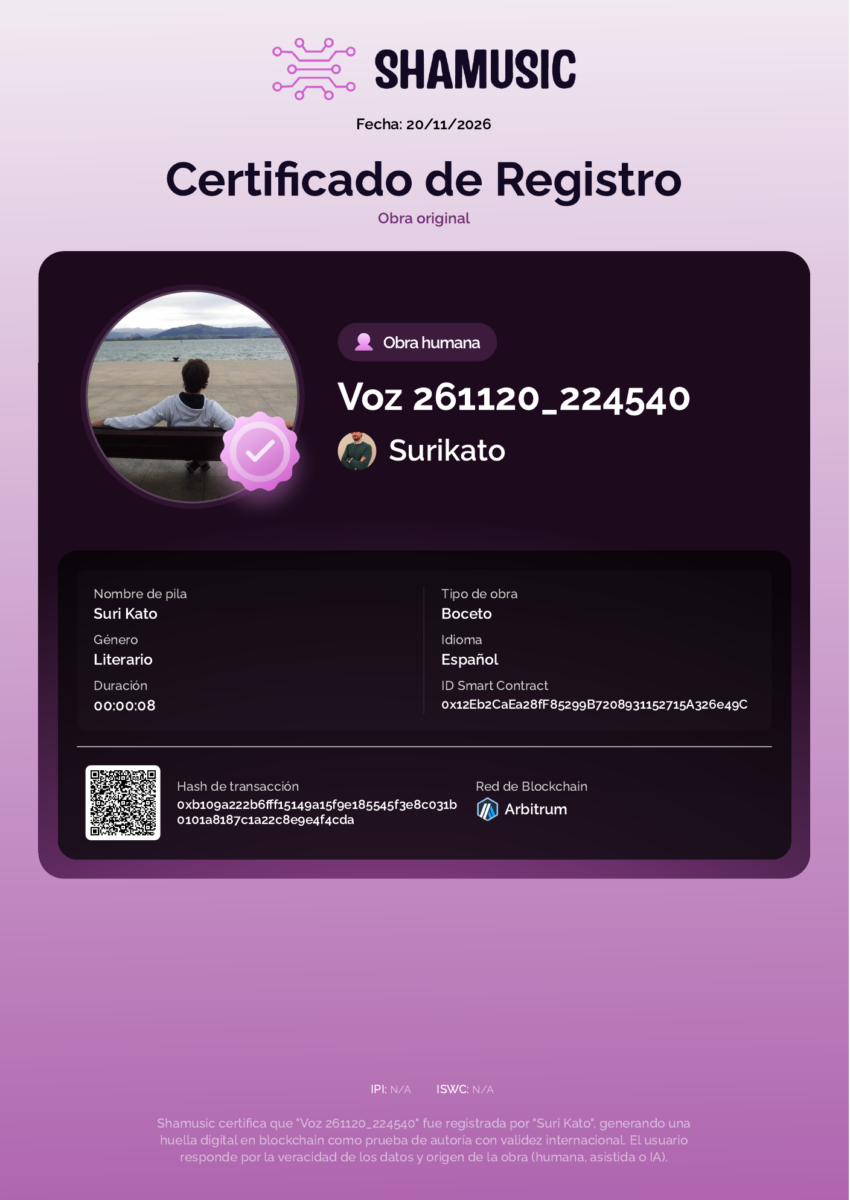
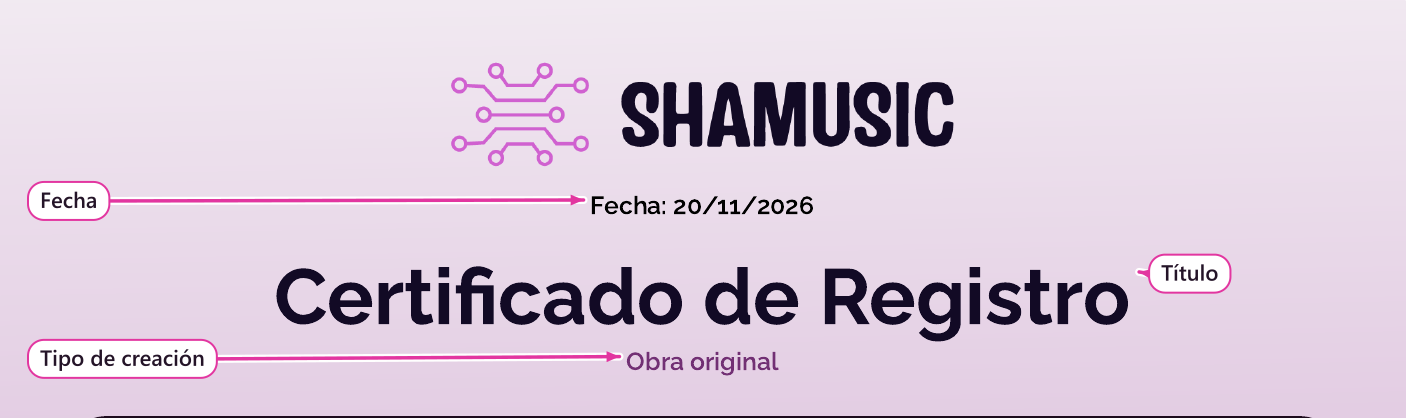
At the top sit the Shamusic logo and the Date. That date is the day the system wrote the registration. It is the timestamp you will later match on Arbiscan.
The document title is Registration Certificate (Certificado de Registro). Under it there is a short line, for example Original work. That line records what you declared at upload: an original work, or an adaptation or arrangement. The type of creation travels with the certificate because it matters when you present the proof.
Cover, seal and origin of the work
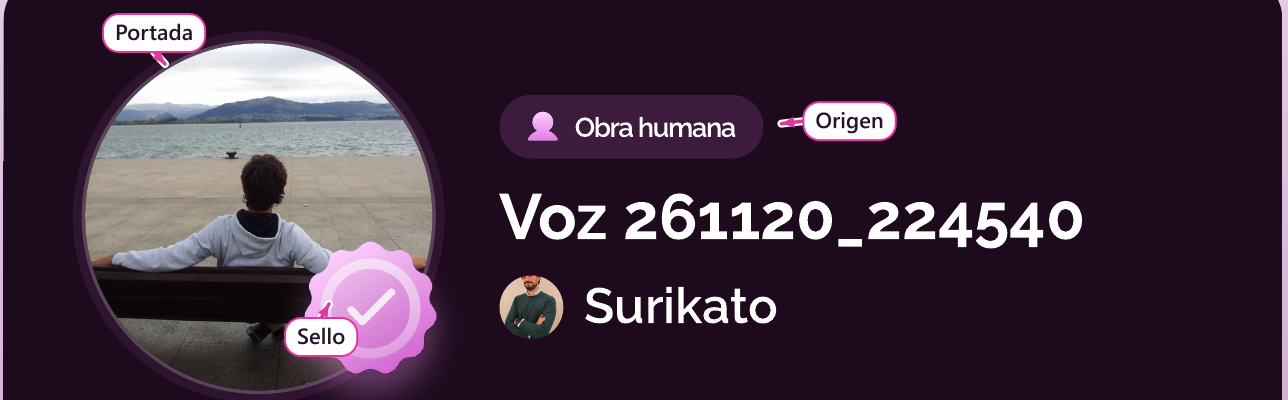
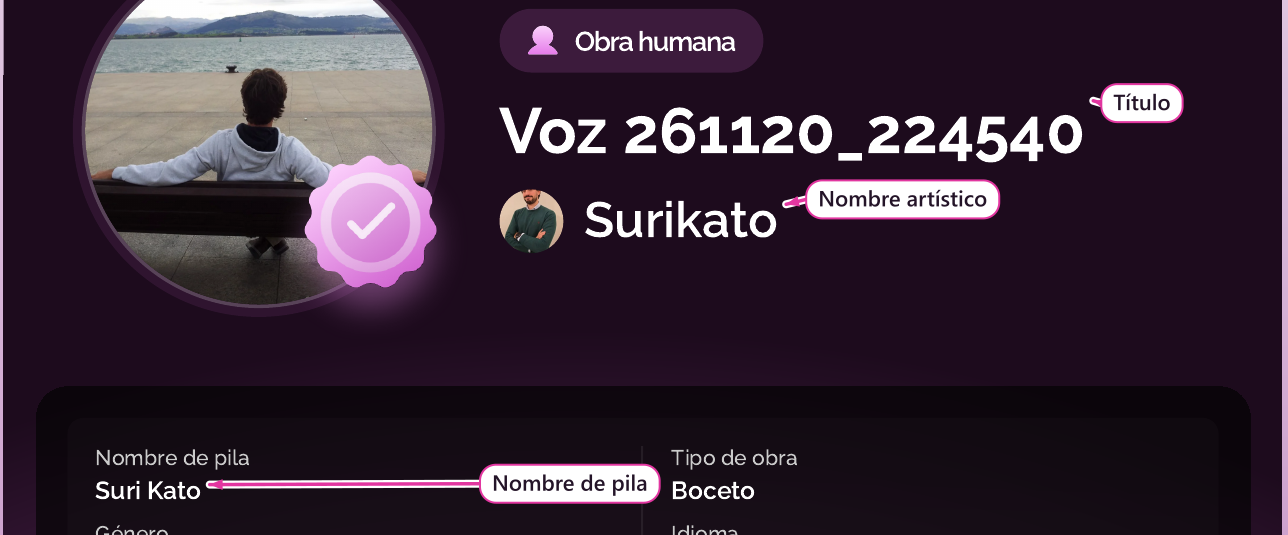
The circular photo is the cover you uploaded with the work. The lilac badge with the check mark shows that this record is already registered.
Next to the title there is a pill, for example Human work. That is the origin you declared: human, assisted or AI. The certificate itself reminds you, at the bottom, that you answer for the accuracy of the data and of that origin.
Title, artist name and given name
The title is the name you gave the work. It can be a song, a beat, lyrics, a sketch or a literary piece. What you typed there is what gets sealed.
The artist name is how you appear on the platform. The given name (Nombre de pila) is your civil name. Keeping them apart is a professional habit: one is the identity you publish under, the other is who stands as author on the proof.
Type of work, genre, language and duration
Type of work describes what you uploaded. In the form it can be instrumental, vocal, score or lyrics, complete song, sketch or another type. If you register an early draft, you will see Sketch (Boceto). If you register the finished song, you will see that type.
Genre is the label you gave the work. You can also register a poem or a literary work: on Shamusic music and text share the same certificate.
Language is the language of the work. Duration is the length of the audio file, in hours, minutes and seconds. On lyrics or a score without audio you may see a very short value, the length of the file you uploaded.

Smart Contract ID
The Smart Contract ID is the address of the smart contract that receives the registration on the network. Think of it as the public mailbox where the write is deposited. It starts with 0x and is a long string of letters and numbers. On Arbiscan, when the transaction is indexed, that same address usually appears in Interacted With (To). If they match, you are looking at the same contract your certificate prints.

The QR code: where it goes
The QR code sits at the bottom left. When you scan it, the phone opens a web address. That address always has the same shape: arbiscan.io/tx/ followed by the transaction hash printed to the right of the code.
Arbiscan is the public viewer for the Arbitrum network, the one the certificate names as Blockchain network. It works as a search engine for that network’s ledger. Anyone with the hash can open the same page and see that the write exists.
Sometimes, before the record loads, Arbiscan shows a short security check. That is the site’s own protection. You wait a few seconds or tick the box, and the transaction page opens.

What you see inside Arbiscan
The page is titled Transaction Details. It is built to look up any write on the network, which is why you will see menus, ads and figures you can skip. For your certificate these fields are enough.
Transaction Hash. The same number as Hash de transacción on the PDF. If they match, you are on the right record. Treat it as the tracking number of your registration.
Status. When you read Success, the network has already included the write. That is the state you want.
Block. The page of the ledger that holds your registration. The block number orders writes in time.
Timestamp. Date and time of the write, in UTC. Compare it with the Date on the certificate. This is the public timestamp.
From. The address that sent the write to the network. It is the technical account that deposits the registration.
Interacted With (To). The address that received the write. On a Shamusic registration this is usually the contract. Cross check it with the Smart Contract ID on the PDF.
Value. It often shows 0 ETH. This is a registration write, a line in the ledger.
Transaction Fee and Gas. The cost of writing that line on the network. The service covers it at registration. On Arbitrum that cost is very low.
Input Data. A long string, often in hexadecimal. That is the encoded content of the write, the fingerprint that enters the ledger. The audio file, the cover and the names in plain language live on the certificate and in your account. On Arbiscan you see the public seal of that fingerprint.
With those four checks (hash, Success, date and contract) you can show the proof to a manager, a collaborator or a contest. The other tabs (Internal Txns, Logs, State, API) are technical network data. You can leave them.
Transaction hash and the Arbitrum network
The transaction hash is the unique identifier of that write. It starts with 0x and is 66 characters long. It is the same value carried inside the QR. Keep it with the PDF: with that number anyone opens the record on Arbiscan.
The Blockchain network field says where the seal was written. On the current certificate it is Arbitrum. That is why the QR points to arbiscan.io, the viewer for that network. Arbitrum is a public network: the write stays in view and it stays put.

IPI and ISWC
At the bottom of the first page you will see IPI and ISWC. IPI identifies the author as a person inside collecting societies. ISWC identifies the work worldwide. ISRC, which identifies a specific recording, belongs to another step and does not appear on this certificate.
If you have not added those codes yet, the certificate leaves them as N/A. Your collecting society assigns the IPI when you register as an author. The detail is in What is the IPI?. When you have them, the certificate shows them next to your name and ties the Shamusic proof to the system that credits the work.

The footer text
The last paragraph on page one is the formula of the seal. It names the work, names who registered it, and states that a digital fingerprint was generated on blockchain as proof of authorship with international validity. It closes by reminding you that the user answers for the accuracy of the data and for the origin of the work (human, assisted or AI). Read it in full: it is the commitment that travels with the PDF.

Page two: who holds the rights
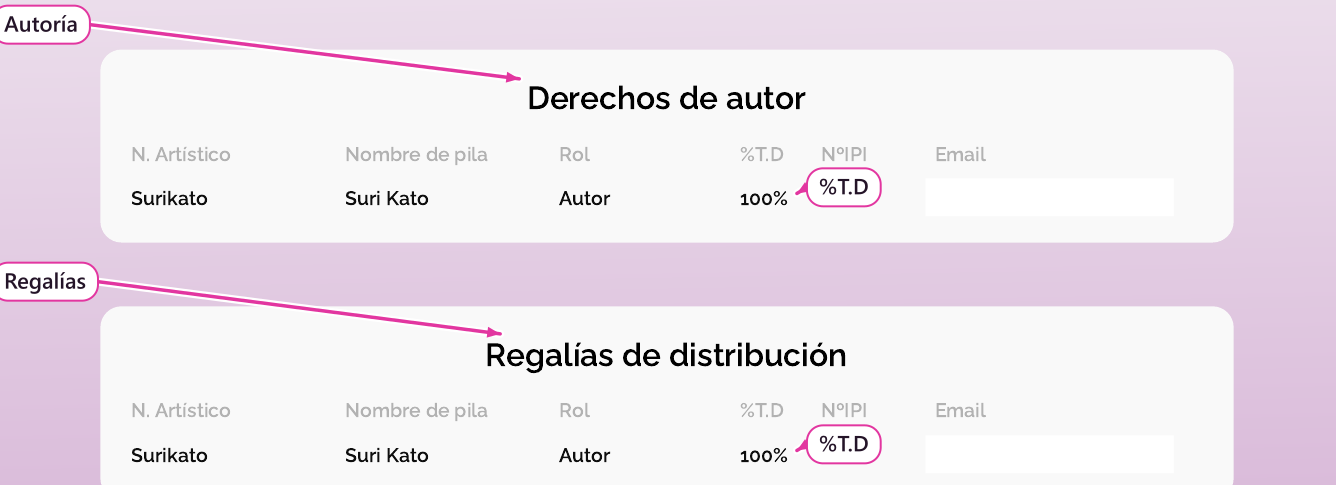
The second page has two tables. Both list the people on the work. The difference is which right each table describes.
The Copyright table (Derechos de autor) splits authorship of the work. You see artist name, given name, role (for example Author), %T.D, IPI number and each rights holder’s email. %T.D is the percentage of rights in that work. If you register alone, you will see 100%. In a coauthorship each person appears with their share and the total is 100%.
The Distribution royalties table (Regalías de distribución) splits the payment when the work is reproduced in a physical or digital format: downloads, streams, physical copies. That is the mechanical or distribution royalty. The names can match the authorship table. The percentages can match or differ, according to what you confirmed at registration.
The email identifies each rights holder inside the document. The PDF is your proof: keep it, and share it with care, because it carries contact details of the people on the work.
How to use the certificate
Download it and keep it. Send it when someone asks for proof of authorship. Show page one and, when the split matters, page two. Scan the QR in front of anyone who wants to see the public seal. The data stay as you confirmed them at registration, and that fixity is exactly what gives the proof its value.
If you want the step by step for uploading the work, it is in How to register songs online. The broader frame of the certificate is in Protect your music.
Frequently asked questions
Why does Arbiscan look like a developer page?
Because it is the viewer for the whole Arbitrum network, open to every write. Your registration is one of those writes. Stay with the hash, Success, the date and the contract. That is the verification.
Where is my song on Arbiscan?
The file, the cover and the authors in plain language are on the certificate and in your Shamusic account. On Arbiscan you have the public seal: the hash, the date and the contract.
What do I do if Arbiscan asks for a check?
That is the site’s security check. Wait or tick the box. Then Transaction Details opens.
Can I change the data after I register?
The data stay as you confirmed them. That is why it is worth reviewing title, authors and percentages before you confirm. The seal keeps exactly that version.
What does N/A mean next to IPI or ISWC?
Those codes are not on the record yet. You can add them when your collecting society gives you the IPI or when the work has an ISWC. The Shamusic certificate is already the authorship proof with date and hash.
Share your music, protect it first
Every field on the certificate is there so you can show the proof with clarity: who, what, when, and with which public seal. The QR opens Arbiscan. On Arbiscan you look at hash, Success, date and contract. The PDF holds the rest.
You start with 3 works free when you create the account. The detail is on the plans page.
Register your song at open.shamusic.es
Share your music, protect it first.