
Demos, versions, the final mix: many songs start and end in a Drive folder. It’s convenient, close at hand, and shareable in a click. What often gets left for later is registration.
It’s not always a lack of motivation. Filling in details and preparing the registration competes with what you really want to do: keep writing. And that “I’ll do it later” keeps getting pushed back.
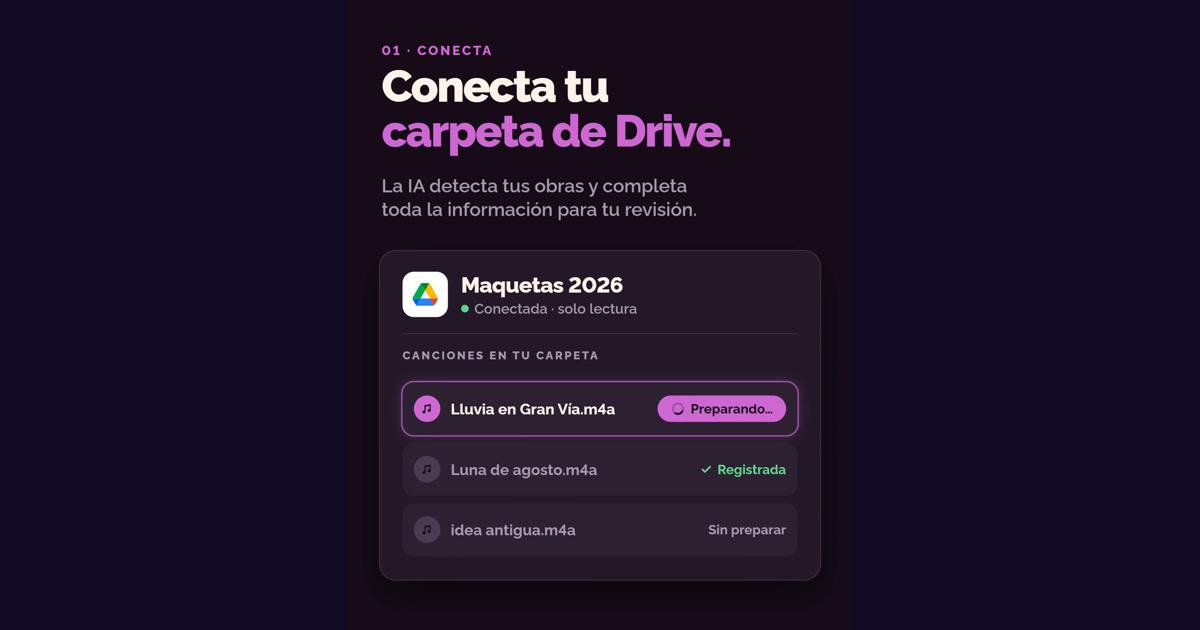
Now you can connect your Google Drive folder to Shamusic. You keep saving your music where you always do, and we prepare the registration for you to review and approve.
Your music stays in Drive. Registration starts in Shamusic.
The idea is to respect how you work. You don’t have to switch tools to organize your songs: you choose a Drive folder and Shamusic prepares each new song as a draft.
That doesn’t mean it’s registered automatically. You stay in control of what to register, which authors are included, and how the rights are split.
If you’ve ever wondered what to do when someone copies a song, in Someone copied my song we go over what steps to take and what documentation to gather. This integration is designed to build registration into your workflow before you run into that problem.
How the Google Drive integration works
1. Choose the folder you want to connect
You decide which folder to connect. Shamusic only accesses that folder, and it does so in read-only mode: it can’t edit, move, or delete your files.
You can disconnect it whenever you want.
2. Each new song arrives as a draft
When you add a new song to the connected folder, Shamusic prepares a draft with genre, mood, instruments, and a description.
We’ll notify you in the platform and by email so you can review it. That way, you don’t start with every field empty each time you want to register a work.
3. Review the authors and the rights split
Before approving the registration, you review who the authors are and what percentage belongs to each one.
This step is still in your hands. The integration prepares the draft, but it doesn’t decide the authors or the split for you. Nothing is registered without your OK.
4. Approve and receive the certificate
When you approve the registration, your work receives a certificate with date and time.
The difference is how you get there: your song starts in the folder where you already work and reaches Shamusic with information prepared for you to review.
What Shamusic can do with your folder
Connecting a tool to your files deserves a clear explanation. In this case:
-
Only the folder you choose is accessed.
-
Access is read-only.
-
Shamusic can’t edit, move, or delete anything.
-
New songs arrive as drafts, not approved registrations.
-
You can disconnect the folder whenever you want.
Connecting doesn’t mean giving permission to register everything without reviewing it. Approval for each work is still yours.
Who this is for
If you already organize your demos and versions in Google Drive, this integration helps bring registration into that routine.
It can also help if you work with other songwriters: once the draft is prepared, you can focus your review on the authors and their percentages before approving.
It’s not about downplaying the importance of that information. It’s about spending less time preparing each registration and keeping your attention on what you need to personally verify.
Frequently Asked Questions
Can Shamusic modify or delete my Drive files?
No. The integration is read-only. Shamusic only accesses the folder you choose and can’t edit, move, or delete anything.
Is every song I add registered automatically?
No. Each new song arrives as a draft. You get a notification in the platform and by email, review the details, the authors, and the rights split, and decide whether to approve the registration.
What information is pre-filled?
The draft includes genre, mood, instruments, and a description. You review the authors and each person’s rights percentage before approving.
What do I receive when I approve the registration?
Your work receives a certificate with date and time.
Can I disconnect the folder?
Yes, you can disconnect it whenever you want.
Share your music—protect it first
Your creative process doesn’t have to change. Keep saving your songs in Drive, connect the folder, and review the drafts that arrive in Shamusic. You decide when they’re ready to be registered.
You can get started on Shamusic, where your first three registrations are free.
Share your music, protect it first.